Steven Brokaw
-
Morgan Witt on Austin Land Use
Candidate for Austin City Council Place 7, Morgan Witt, quoted in the Austin Monitor
The reality is that when we talk about preserving neighborhoods as they exist right now, that means we’re excluding people from those neighborhoods, If we don’t develop in these neighborhoods, people build outward. That means the people most vulnerable to being displaced because of lack of affordability, they have to move further out of the city; they have less access to resources, they have more transportation costs to get to work, but also we as a city have to spend more money in infrastructure to build out so that people can access the city.
While we think that not developing in these neighborhoods is protecting the environment, the reality is sprawl is a huge environmental issue. We really need to think about how can we be more inclusive as a city and allow more people and more diverse people to live in the neighborhoods that exist so that everybody gets the opportunity to live that Austin experience and share in that neighborhood character.
I wish her luck in her campaign.
8/25/2020, 7:00:00 PM
-
iA Writer 5.5 Improves Wordpress Support
iA Writer just updated to version 5.5. This looks like a significant update, with one big feature that affects me: better support for self-hosted WordPress sites. Previous versions required the Jetpack plugin, which I balked at using. Now I can use the IndieAuth plugin. The OAuth2 plugin is also supported with a little more configuration.
This is my first post with iA Writer 5.5. It took me a couple of tries to get the plugin to work–documentation is scarce. But it works as advertised. Here’s hoping it leads to more posts here.
5/15/2020, 7:00:00 PM
-
Markdown for Technical Documentation
It seems like this advice comes along periodically: Don’t use Markdown for technical documentation. Hillel Wayne is the most recent plea to hit hacker news, but there have been others.
Hillel Wayne, Please don’t write your documentation in Markdown
Markdown cannot carry data. There’s no way to imbue properties into text using markdown. Good documentation is all about the semantic markup. A “definition” is not just a different formatting or like. It means there’s actually a concept of a “definition” as a discrete concept in your documentation.
Matthew Butterick, in Pollen: the book is a program:
Markdown is a limiting format for authors. Why? Because Markdown is merely shorthand notation for HTML tags. As such, it has three problems: it’s not semantic, it only covers a limited subset of HTML tags, and it can’t be extended by an author.
Eric Holscher, Why You Shouldn’t Use “Markdown” for Documentation
Though many people have added extensions to Markdown, almost none have any kind of semantic meaning. This means that you can’t write a Class or a Warning, you can only write text.
Mister Gold, Stop Using Markdown For Documentation
With Markdown you can only write text. It means that if you need to grab the reader’s attention with some kind of notes or tips, you have to embed HTML.
I have focused on the lack of semantic data in all these criticisms, because I think it is the most important drawback. The lack of semantic meaning in markdown makes in unsuitable for many technical writing tasks. Yet, I still write in markdown. This post is in markdown. There are a couple of reasons:
- Its easy. I never forget the syntax. This may be because it is so limited, but it makes it easy to do simple documents.
- It’s ubiquitous. The fact that there are so many different markdown parsers is not problem, its a strength. It’s usually trivial to add markdown to a system or workflow, regardless of the environment
What are the alternatives?
ReStructurexText – If I were writing a book, I would probably use ReStructuredText. It is extensible, so you can add your own “roles”. But the syntax is pretty hard to remember. For example, here is the image syntax:
.. image:: images/biohazard.png
    :height: 100
    :width: 200
    :scale: 50
    :alt: alternate text
Of course, the benefit is that the image tag has a height, width, and scale: something few markdown parsers support. It’s heavily tied to Python, which is something I’m comfortable with. It’s also heavily tied to a single implementation in docutils.
AsciiDoc – The syntax is more in the spirit of markdown. It seems to have coalesced around a Ruby implementation, and left the original python implementation languishing[1]. I was unhappy with the HTML produced by asciidoctor is styled entirely by
divtags. Title ; just styles applied to nameddivtags.Pollen – Very nice system. The fact it requires Racket is both admirable and a real-world pain. I gave up after trying to write my own pollen command. Trying to debug the unexpected return type from a nested s-expresion did me in.
For now, I stay with markdown, and all it’s shortcomings.
- There are also two competing versions of aciidoc for python3: asciidoc-py3 and asciidoc3 ↩
3/25/2020, 7:00:00 PM
-
Three Days, Three Rings
One thing I noticed during these coronavirus work-at-home days is how absolutely sedentary I am when working from home. I’ve worked from home in other jobs, but I really notice it now. My Apple Watch detects essentially zero exercise, and very little activity. At work, all the small trips to the water fountain, to the restroom, to the cafeteria, they all add up. They don’t close my rings, but they at least make it look like I did something besides sit on my butt all day. At home all of those little trips are about 20 feet away, max.
In the last few days I’ve been making an effort to get out and close my exercise ring. I no longer have a commute, so that gives me an extra 45 minutes to an hour I can devote to exercise. I’ve been getting my rings closed, and breaking free of the stay-at-home ennui.
3/22/2020, 7:00:00 PM
-
Remote Cheese Tasting
In the spirit of supporting our local business during the pandemic, we signed up for a cheese-tasing course with Antonelli’s. We picked up a half pound of cheese from their shop: a pre-selected sampling of seven different cheeses. Then we embellished it with a little prosciutto, Castelvetrano olives, a baguette, and some wine. We then tuned into their video stream while they talked us through the full tasting menu. It was great, especially considering they had never streamed a tasting before and rushed into it with about a week’s preparation.

3/22/2020, 7:00:00 PM
-
Wordpress Theme Search
Every so often I gather the strength and resolve to try to get a Wordpress theme that does what I want. I want it to:
- Not look terrible–mostly minimal, optimized for reading text, but enough photo support for the occasional gallery post
- Support latest standards like micro formats
- Responsive, but no hamburger menus in the full size view
- Use the Wordpress content formats to appropriately style an aside as an inline Twitter-style post
Finally, I always end up wanting to make this interop with Twitter and Facebook.
Right now I’m using a theme that hasn’t been updated in years, so I need to find an update. I am not particularly looking forward to it.
3/21/2020, 7:00:00 PM
-
WordPress Hosting
While I’m on the topic of WordPress, I found a new hosting provider. I run a small family site. Even though it’s small, it has a lot of specific needs:
- It’s very image-heavy, so it needs lots of storage space
- I need to send out email notifications at various events
- Users need to be able to post by sending email
- It needs to be robust and reliable, so I don’t spend a lot of time chasing down issues.
We’ve tried various hosted solutions. Wordpress.com was hosting it for a while. At some point, they made changes to their user profile settings, and some users were having issues I couldn’t help them with. I moved to self-hosted so that I had enough control to address these issues. Besides, our disk usage was growing and I was likely to get priced out of the free plan.
There are several shared plans that I looked into. They often come with an email serve I can use, but my experience with them hasn’t been great. Running a DigitalOcean droplet works great, until it doesn’t. Then it takes all Saturday to figure out what’s goin on. There is a next tier of plans that help you manage a VPS. ServerPilot and RunCloud are a couple of examples. They help with the setup of the web server and database, but after that, you’re on your own. They don’t have a mail server, and only the foolhardy run their own mail server. Then I found CloudWays. It does all the stuff ServerPilot and RunCloud do, but they also offer mail server add-on. For $1/month, I can add a RackSpace mailbox. I use this for incoming post-by-email traffic. Then for a few cents per 1000, they offer an outgoing SMTP server. I could (and have) patched this all together with a service like Migadu. But having it integrated with the server is a big plus.
3/21/2020, 7:00:00 PM
-
New Theme, Take One
Well, here I am, with a new theme. I’m giving GeneratePress a whirl after discovering it on the WordPress subreddit. I want a pretty simple, text-heavy site. I don’t have a store, a shopping cart, or any heavy layout needs. My main interest is fonts and typography, and this gives me enough control. I can also tweak various layout elements as much as I need.
There’s a pretty capable free versions, I paid the $50 for the pro upgrade. That pricing is perfect: it makes me reasonably confident the theme will be supported and upgraded, but it’s cheap enough for a hobby site with no income.
If you looking for more like this, Astra is another one that came up, with a similar pricing structure. I don’t have a particularly good reason to choose GeneratePress over Astra. I think it was partly that the pricing and the product info gave me the impression their market is individual bloggers, whereas Astra is trying to address agencies and WordPress freelancers. Like I said, not a great reason, but they both looked good, and I need some basis to make a decision. Hopefully there is no Take Two sequel to this post, but if there is, it will probably be Astra.
3/21/2020, 7:00:00 PM
-
West Texas
We went to West Texas in November. Turns out it was an ideal time to go: cool at night, and the midday sun was not strong enough to be miserable.
We stayed at El Cosmico in Marfa for a couple of nights. Here is the inside of one of the tipis. Plenty of space and a fire pit to boot.

Inside an El Cosmico Tipi
Finding the desk at Sul Ross in Alpine was harder than we expected. It was pretty far, and we felt lost a couple of times. We pressed on and eventually found it.
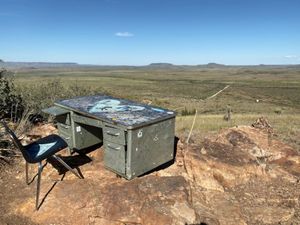
The Famed Desk at Sul Ross
12/21/2019, 6:00:00 PM
-
Austin Orange Line Workshop
Depending on the map you look at, the Orange line is either a 21 mile route from Howard Lane to Slaughter Lane, or–if you ignore the parts marked “future expansion”–an 11 mile route that runs from North Lamar transit center to Stassney. In either case, the midsection of the line runs through the center of town via Lamar, Guadalupe, and South Congress.
According to Capital Metro, the 6.5 mile segment from Koenig to Oltorf is under consideration for grade separation, such as subway or elevated. Should it be? That is the question posed to the community.
Some of the tradeoffs presented are construction cost, right-of-way fit, and travel speed. Cost and political viability were not explicitly under consideration by the transportation engineers.
Sticking with the transit considerations: Guadalupe near 29th is particularly narrow and difficult to fit two dedicated lanes of transit in addition to the existing two lanes of car traffic. Even giving up the middle chicken lane and the parking makes things tight.
How sacred are the lanes of car drivers currently on Guadalupe. Mayor Adler has named them a priority. The transit engineers at the meeting seemed more accepting of talking about trade-offs, whatever those were.
So what about the price of the options offered? Jerry Smiley was hesitant to offer a concrete metric. Site-specific was his favorite term to temper desires for specific numbers.
In general, elevated and CNC are more than surface; tunneling is more expensive than any others. But the scale factor was highly site-specific. Sometimes cut and cover can run into problems that it would have been easier and cheaper to just bore underneath.
There was less discussion around route and station selection. In general the route was deemed sane, and far better than the route offered to (and declined by) residents in 2014. The local 1 bus will probably still run the length of Lamar-Guadalupe. The stops will be more frequent, and the bus will be stuck in traffic the way they are today.
7/29/2019, 7:00:00 PM
-
Ulysses vs. iA Writer
I’ve been looking for a serious writing program. Maybe serious isn’t the right word, because I use Vim and BBEdit, and those are nothing if not serious. But they don’t feel right for the type of concentrated, long-form prose that I am trying to write. The contenders that I settled on are iA Writer and Ulysses.
Both are great, and I would recommend either. Choosing between them is more about your personal preferences, workflow, and writing needs. My observations based on my particular needs are below.
You should also check out the comparison by Marius Masalar.
Comparison
This is not comprehensive, just a few things that happen to be important to me.
Post to Wordpress
Ulysses posts to self-hosted Wordpress installations.
iA Writer requires Jetpack for self-hosted Wordpress.
I have no desire to install Jetpack, so this is a drawback to iA Writer. Ulysses works exactly the way I want it to.
Update: Starting with iA Writer 5.5, Wordpress posting on personal sites has been improved.
File Management
iA Writer works on files. Ulysses works on “sheets,” a file abstraction that lives in a database owned by the application.
Both approaches have their advantages. iA Writer’s advantages:
- The files are searchable with Spotlight. Using Finder to search for things will reveal your iA Writer files just as well as searching within iA Writer.
- The files are portable. It is easy and immediate to edit the files in another program. I can use BBEdit or Vim to open a file I created in iA Writer without having to export.
- I can keep the files in a git repository. iCloud probably serves most writers’ needs, but if you’re a git user, having your history in a repository is reassuring.
The downside is that I am doing my own file management. I have to decide what to name a new document. I have to decide where to save my file. These little decisions can slow me down.
By contrast, Ulysses works with a container that manages the files for me. The benefit of this is that no file name or folder location is required when I create a file (or “sheet”). Just ⌘N and I’m ready to write.
It also easy to compose a work of many sheets. It lets me think in sentences and paragraphs instead of files. I can combine sheets, rearrange their order, “glue” sheets together, and split them apart. It’s more flexible and useful than iA Writer’s “content blocks.”
Fonts and Appearance
Ulysses has a very detailed preference pane to customize every element of my Markdown syntax. I can create themes, and I can use themes created by others. Ulysses comes with a solarized theme, so I picked that. Then I noticed that there is another solarized theme: slightly different and more in line with what markdown looks in MacVim. So I changed to that. After a while, that started to feel garish, so I switched to a theme that mimics Editorial. This was great. But now that theme is starting to look a little…I don’t know…too subdued, maybe. I’ll find something I like if I keep looking. If not, there’s a way to create custom theme styles…
iA Writer looks great. There is a setting for light or dark. There is a font setting with three choices. I picked the one I like and haven’t given it much thought since. I feel none of the theme malaise that Ulysses makes me feel.
Markdown
iA Writer is straight markdown, more or less. More textual than Ulysses, anyway. That is, a link in iA Writer looks exactly like you would expect:
[Link anchor text](http://example.com/path/to/target.html)Ulysses has clever little additions that make it less textual and more graphical. The target URL is not listed in the source view. If you double-click on the link text, a little inspector window opens to show the target link. It’s very well done, but I feel the textual nature of markdown is a benefit, and Ulysses loses that.
Share Extension
Ulysses has a (poor) Safari share icon. It can paste a web site title and URL, and that’s about it. It is no match for Bear or Keep It.
iA Writer has no service or share extension.
(Preliminary) Decision
I like iA Writer better. Even though Ulysses does have real advantages, iA Writer just feels better. I like the fonts and the built-in preview styles. I like the more standard, textual markdown source. I like the options for previewing the rendered markdown.
The file handling goes both ways. I can totally get behind Ulysses’ philosophy, but I like having my content indexed in Spotlight.
I love that Ulysses can post directly to my WordPress blog. I get around this iA Writer deficiency by using Byword to open the file created by iA Writer and posting from there. This workaround may become tiresome, but for now it works.
This comes down largely to aesthetics and intangible preferences.
Potential Game Changers
These are things that might tip my decision the other way, after more time using them.
- WordPress posting. Ulysses just does WordPress posting the way I want.
- File management. I can see myself coming to prefer Ulysses’ style after a spending more time with both.
- Writing Goals. Ulysses can track writing goals, both daily, and set per sheet.
Non-issues
iA Writer has a feature that will highlight words based on parts of speech (nouns, verbs, etc.). I don’t find this useful.
Many are outraged by the subscription pricing of Ulysses. It doesn’t bother me. It is useful how a single subscription gives me access to macOS and iOS versions of the app. If I start writing more with my my iPad, this might be useful.
Recommendation
My recommendation is that you can’t decide, get both. You can get a week’s trial of both. If that isn’t enough time, just buy iA Writer, and buy a monthly subscription to Ulysses. Give yourself a couple of months to settle into them both. One will reveal itself as your favorite.
This is what I’m doing. I prefer iA Writer, but Ulysses has clear advantages. I want to live with both and see which feels better over the long term. There might be drawbacks to iA Writer that get annoying only over time. When I make a final decision, I’ll post an update.
7/6/2019, 7:00:00 PM
-
City Grid
From the BBC: The Hidden Ways that Architecture Affects How You Feel.
One thing that is guaranteed to make people feel negative about living in a city is a constant sense of being lost or disorientated. Some cities are easier to navigate than others — New York’s grid-like street pattern makes it relatively straightforward, whereas London, with its hotchpotch of neighbourhoods all orientated differently and the Thames meandering through the middle, is notoriously confusing.
I can speak to neither New York (which I found confusing), nor to London, but the Hyde Park neighborhood is one of Austin’s more walkable neighborhoods, and it is built on a pretty rigid grid.
7/3/2019, 7:00:00 PM
-
The Traveller and the Sport
I wanted a new fountain pen that would better fit my passport-sized Midori Traveller notebook. I’ve been using a Pilot Metropolitan and a Platinum Preppy. The Metropolitan is a little too fat. The Platinum fits better, but the clear plastic dresses down the Traveller. The Kaweco Classic Sport is a short, pocketable fountain pen that has a barrel that looked like it might fit inside the Midori pen loop without a clip (the Sport doesn’t come with a clip). The pen writes great. The fit in the notebook is okay, but not perfect. You can see how lose it is in the photo below. With a little help with the elastic band, it’s okay. I got the plastic version of the Sport, so I don’t worry about losing it as much as much as I would with a nicer pen.

Kaweco Sport Classic and Midori Traveller
6/17/2019, 7:00:00 PM
-
Choose Me
It’s common for a movie to have two-dimensional characters, poorly acted, placed in a riveting plot. The Star Wars comes to mind. It’s somewhat more rare for well acted and complex characers to be placed in a manifestly ridiculous plot. But that’s what Choose Me is. The plot feels like it owes a debt to Three’s Company in that the most improbably coincidences place characters in one another’s bedrooms. But somehow, the characters make it all work. Keith Carradine plays Micky, a mental patient who either escaped or was released from his institution. It’s not explained which. Nor is it explained whether he is a pathological liar or a former spy. Or a romantic or a creep.
Mickey lives in LA and hangs out at a bar named “Eve’s.” He mainly hits on two female roomates. One roomate is a host of call-in radio sex counsellor. The other roommate owns the bar and is a frequent caller of the radio show. Somehow, neither of the roommates realizes they are talking to each other on this call-in show. You might thing the distictive accent of the radio host would be a tip off.
Describing the plot of the movie makes it sound far more ridiculous than it is. The characters are all neurotic to some extent, and the movie is entirely about their interactions. Just accept the plot as a given, and try to pick out whether the mental patient is really a lover; wheter the sex therapist finds her first love; and wheter the jaded bar owner settles down for a one-man committment.
6/16/2019, 7:00:00 PM
-
Merchant of Venice
Sunday before Memorial Day was the last day of the Austin Shakespeare production at Zilker park. Here we are waiting for the play to start.

Waiting for the play to start
5/26/2019, 7:00:00 PM
-
Rock ‘n’ Roll High School
Today’s movie is Rock ‘n’ Roll High School. It a it is an updated, punk-rock version of a Frankie and Annette teen romp, just as the Ramones are an updated version of 60’s pop. And while the Ramones are legit punk, it is too sweet and good natured to feel truly disreputable. That is probably it’s biggest charm. None of the students are really ruining their lives.
The story belongs to two girls: Riff Randall, who thinks school is a drag and just wants to have fun, and her smart friend Kate Rambeau. Kate is apparently on track to be valedictorian but keeps getting in trouble by hanging tight with Riff. It’s like Lindsay from Freaks and Geeks never stopped hanging out with Millie, her mathlete friend. Another break with expected types is the high school star quarterback: he is neither the villian nor a hero. He’s just another dull high school boy who doesn’t know how to talk to girls.
The Ramones play a concert, and while it isn’t really concert footage but it’s great band footage regardless. It was probalby about the most serious thing in the movie. Consisering they played a song about Pinhead at a concert attended by a six foot mouse, that sets a low bar for seriousness.
5/25/2019, 7:00:00 PM
-
Return of the Secaucus 7
I saw Return of the Secaucus 7 as part of Richard Linklater’s Jewels in the Wasteland series at the Austin Film Society. This is often described as “The Little Chill,” as it is generally recognized being a spiritural successor to The Big Chill, a movie I viscerally hated when it came out. Secaucus 7 is populated by a group of more sympathetic people. The idealists went on to become teachers, doctors, drug abuse counselors.
It’s a talky, actorly movie, and the best scenes are dialog: Three guys recite a perfectly timed ensemble of a motor sports commercial: “Sunday! Sunday! Sunday! At Washington Valley Speedway: thrills, chills, and spills!” Another scene has a woman vomiting off screen in another room, while to guys try to figure out who it is based on the sounds. “No, Maura more of a ralpher.”
It kind of makes me wonder how I’d react to The Big Chill now.
On a side-note, Linklater revealed that the big money in Hollywood is in rewrites. When a multi-million production is scheduled to start and they have script problems, they’re willing to shell out a boatload of money for a week of work. Apparenly Sayles is a writing machine, makes a living this way, and rolls much of the money into is indie projects.
5/24/2019, 7:00:00 PM
-
Post by BBEdit
I’ve gone back and forth from static site generators, like Jekyll and Hugo, to hosted sites like Wordpress, which is the current platform. One of the benefits of static site generators is the ability to write posts in markdown and keep my content in a git repository. The advantage of Wordpress is the ecosystem around it. There is a plugin for just about everything, and good themes are easy to find.
This is my latest attempt to have my cake and eat it too. I wrote a script to turn a markdown file into HTML and post the result to Wordpress. I don’t have a good way to post photos, and I don’t have a way to update the post. At this this will help me see if the writing method was really hindering my posting, or whether that was just an excuse.
4/20/2019, 7:00:00 PM
-
Best Travel Promo Ever
Oita City released a promotional travel video featuring a breakout performance by a monkey. Now I want to visit based on this video alone.
4/20/2019, 7:00:00 PM
-
Posting with Byword
ByWord is another app I’ve tried for posting. It works well on a Mac, and it has support for posting to a self-hosted WordPress blog (publishing to Wordpress requires a in-app purchase, which I bought). I just realized that it has support for uploading local image files. It detects them in the markdown document, and uploads them to the server. This might be the thing I need to use. As a test, here’s a picture from onbaord the schooner Seaward

Schooner Seaward on the Sea of Cortez
3/9/2019, 6:00:00 PM